EBSuite CRM has had the 'Call Management' feature for you to manage Outbound Calls for a while, with Call Scheduling, Call Scripts, Call Assignment, Reminders, and Reports. To see a demo for that, please follow the link below:
http://helpdesk.ebsuite.com/supportbbsd.jsp?id=151
Now we have added the features for you to manage 'Inbound Calls'.
An Inbound call can be
- A unscheduled call from one of your customer
- An expected flood of inbound calls as campaign response
- Regular Sales / Support inbound calls
You can still use Notes to record the discussion of a phone call. But to use our new Inbound Call feature, we have several advantages over using notes.
- You can use Call Scripts. This can help when you are answering a campaign response, or as a scripted support answer call.
- The Call will have not only the start time, but also duration.
- If you are in the professional service business, you will be able to turn the call (one-click) into a Timesheet, and later charge your client.
- Better reporting.
- How do I record an Inbound Call?
There are 3 ways you can start to record an inbound call.
- In the Contact Detail page, Detail / History. This is the page where you can quickly add an Appointment, Task, Note, Call, and now an Inbound Call.

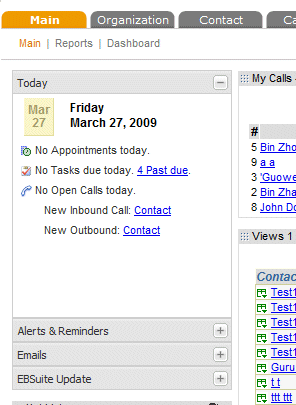
- In the Main page, 'Today' portlet. Click on the phone icon to the left of 'No Open Calls today'.
- If you have setup the remote pages (Account->Setup->Web Service API->Remote Pages ), then when a call comes in, your phone system will automatically popup an EBSuite page, with caller ID (phone number, and/or name ) passed in as parameters. EBSuite will automatically search for the phone number and name, and lead you directly to the 'Inbound call' section of that contact.
|


